

Docs/ Custom Migrator
Set up Custom Migrator
Custom Migrator comes installed on your Espresso Cloud sites.
Who can do what
| System Manager | Hydra Admin | Hydra User | |
|---|---|---|---|
| Open the Custom Migrator page and push | ✓ | ✓ | ✓ |
| Change Migrator Settings and + Add DocTypes | ✓ | ✓ | |
| Read the Migration Log | ✓ | ✓ | ✓ |
| Delete Migration Log entries | ✓ |
The Hydra roles come with HydraAI. Without HydraAI, only System Managers can use Custom Migrator.
People also need read access to each type they export. Most of the default types are readable only by System Managers, and Server Scripts also need the Script Manager role. Without it, the page shows "Failed to Load Items" when Server Script is ticked.
Create a GitHub token
Create a fine-grained personal access token on GitHub (Settings → Developer settings → Fine-grained tokens):
- Repository access: only the app's repository.
- Repository permissions: Contents: Read and write and Pull requests: Read and write. GitHub adds Metadata: Read automatically.
A classic token with the repo scope also works. Custom Migrator works with GitHub.com only, not GitHub Enterprise or GitLab, and repo names containing a dot aren't supported.
Fill in Migrator Settings
Open Migrator Settings. The form unlocks one field at a time, so fill it in this order:
- Target App: the app the customizations will be written into. Repository URL fills in from the app's Git remote.
- Repository URL: check it points at the right GitHub repo, such as
https://github.com/acme/acme_erp. - GitHub PAT: paste the token.
- Save. The token is stored encrypted and never shown again.
- Base Branch: the branch your pull requests merge into, such as
mainordevelop. The list comes from GitHub, so it only fills after you save. - Click Test Connection.
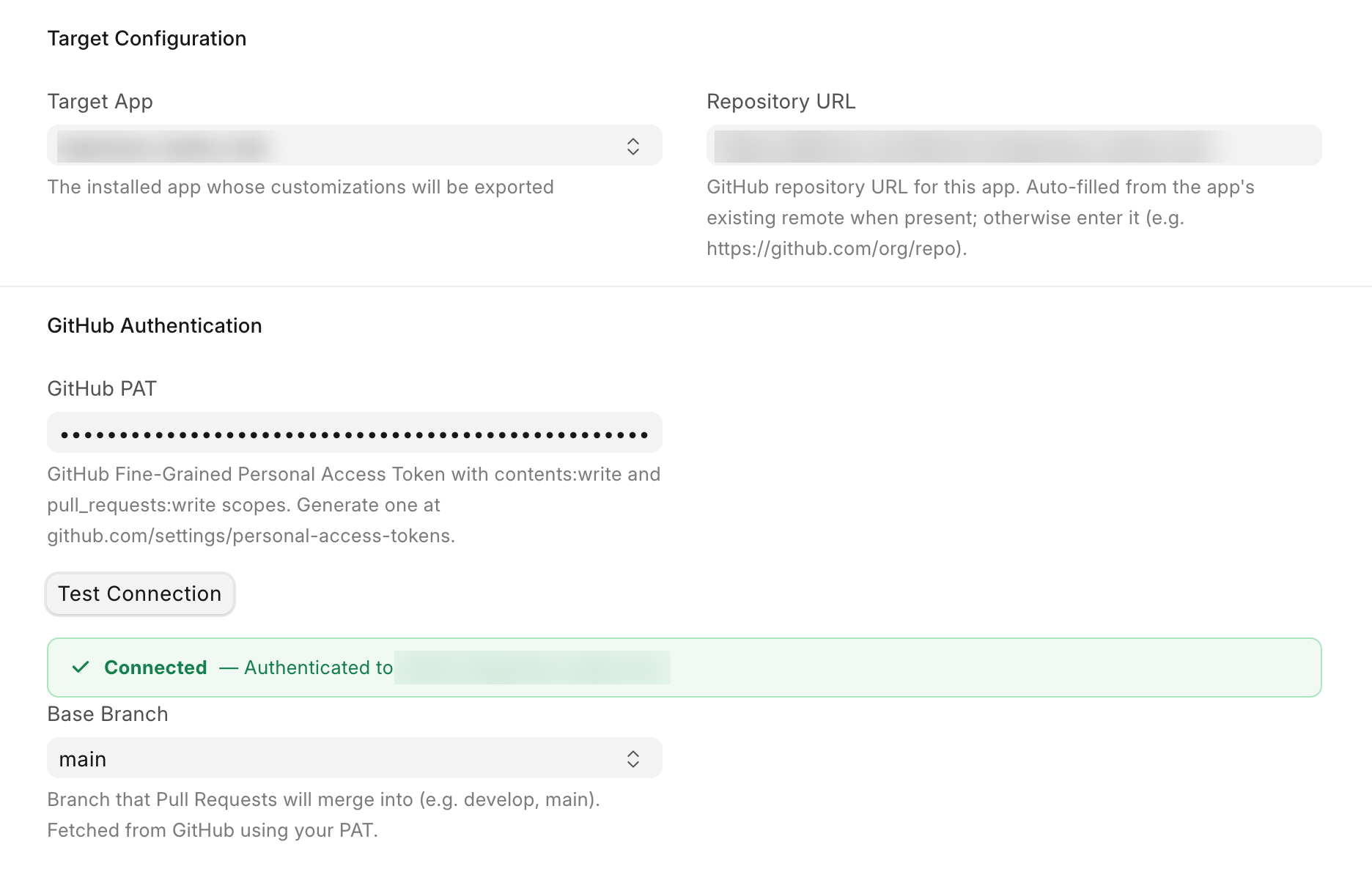
Connected — Authenticated to owner/repo means the token can read the repo. It doesn't prove the token can push or open pull requests. You'll find that out on the first push.
If it fails, see Troubleshooting.
If the app folder isn't a Git repo
Some Docker images ship apps without their .git folder. Settings then shows an orange note, "No git repository found", and an Initialize Git Repository button under Target App.
Pick the Base Branch first, then click the button. It links the folder to your repo and checks out the base branch, without changing any files.
Set it up from the command line
bench --site your-site configure-migrator \
  --target-app acme_erp \
  --remote-url https://github.com/acme/acme_erp \
  --github-pat github_pat_xxx \
  --base-branch main
Only the options you pass are changed, and it tests the connection afterwards.