

Docs/ Custom Migrator
Migration Log
Every export, push and pull request is recorded in Migration Log. Open it from the Custom Migrator page or the awesome bar. Entries are numbered MIG-0001, MIG-0002 and so on, and can't be edited afterwards.
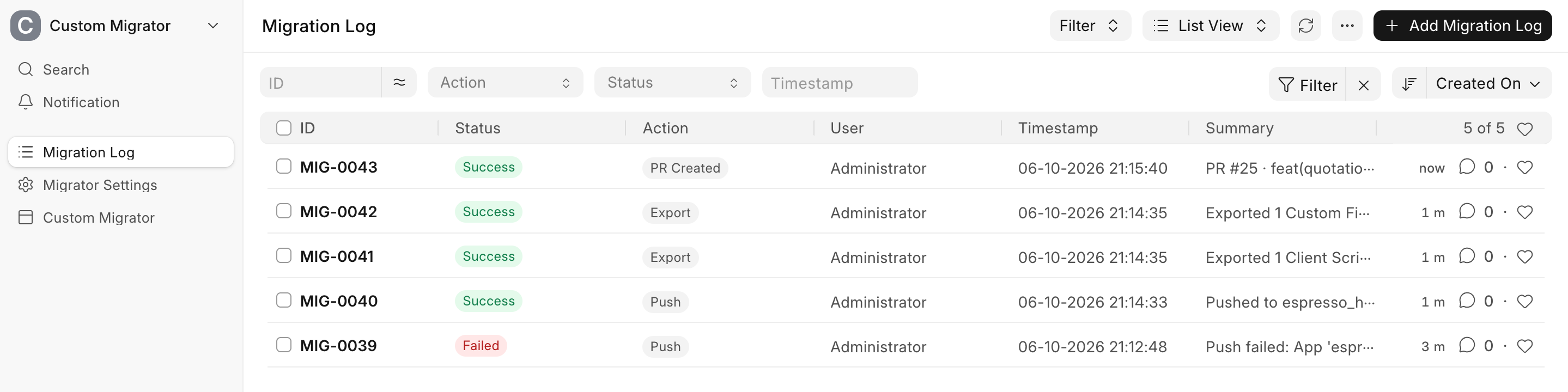
What each entry says
| Action | Written when | Shows |
|---|---|---|
| Export | Files are written: by Export Only, or once per type during a push | Files changed, items |
| Push | You click Commit & Push | Branch, commit hash, tag, items, error if it failed |
| PR Created | A pull request is opened | PR number and link, plus a link back to the push |
Status is In Progress, Success or Failed. A push succeeds or fails as a whole; nothing is pushed half-way.
The Items table lists each record with its type and whether it was New, Updated or Skipped. Click a name to open the record.
Filtering
Use the Action and Status filters at the top of the list. To see failures, filter Status = Failed. The Failed shortcut in the filter menu currently shows nothing; see Known issues.
Stuck entries
If an entry stays In Progress for more than 30 minutes, it's marked Failed automatically, with the message "Marked Failed by sweeper". The background job most likely stopped. Push again from the Custom Migrator page.
The banner on the page
The Custom Migrator page shows the result of the latest push by anyone: Last Migration Successful, with the branch and commit, or Last Migration Failed, with the error. Close it with the ×.